Showing posts with label KDE. Show all posts

Saturday, September 20, 2025

Celebrations with the GPL

This post is to celebrate a few things despite the events that are clouding our feelings. 😠

Another thing to not celebrate is the slaughtering by Sourceforge of my developer web site, which they are calling "sunsetting", by October. I've already migrated it

On the other, brighter hand, I'm celebrating this week La Mercè, which is the local festivity of Barcelona.

 Castellers of Barcelona
 
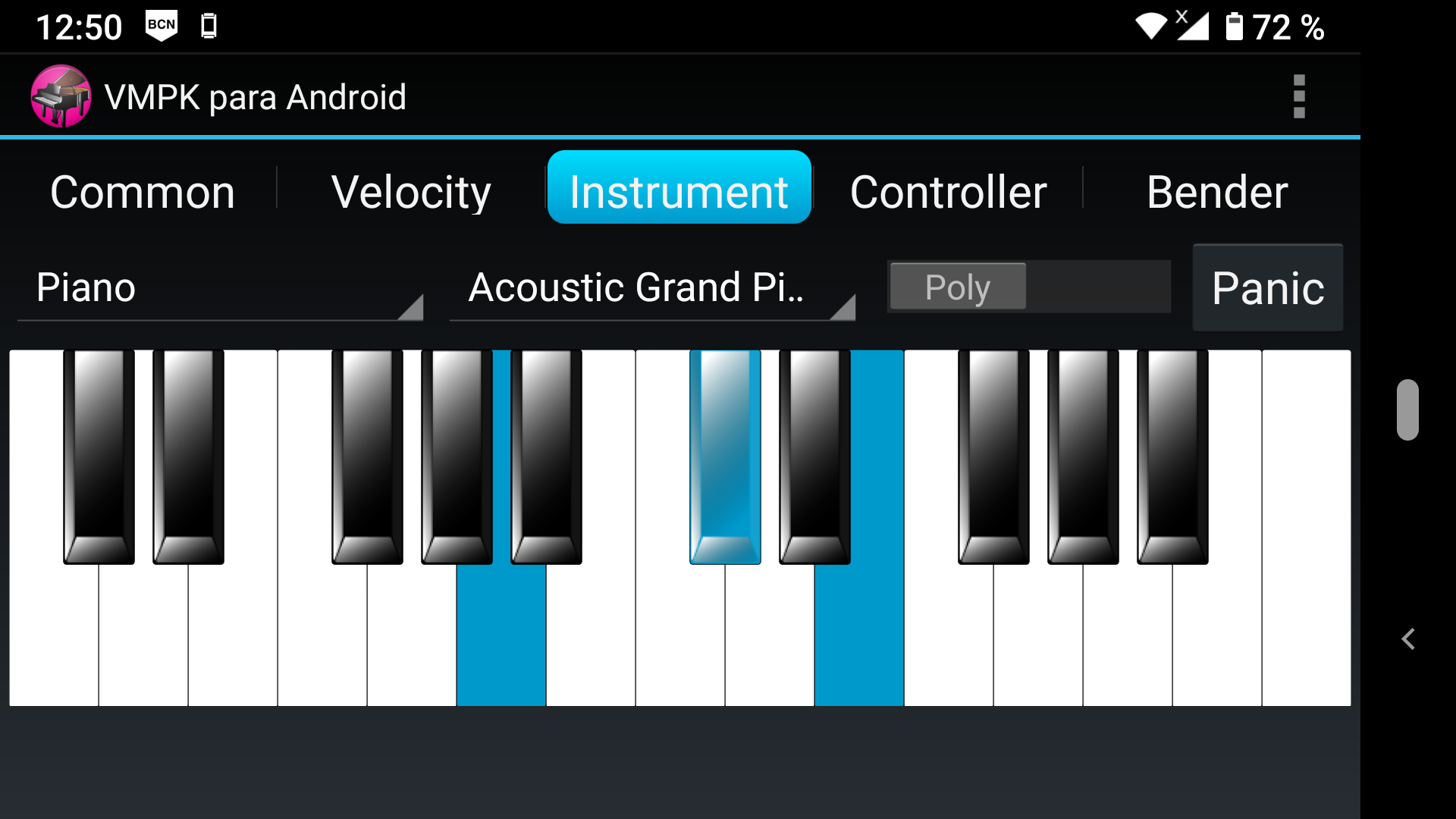
Another event to celebrate is the first 2 million downloads of VMPK for Linux, Windows and Mac. The Sourceforge statistics do not include the installs thru Flatpak, but you may realize that more than 75% of the Sourceforge downloads are the Windows packages. The 2 mil download happened some past day of this year 2025. I've promised a celebration, and now, I have released the Android port of VMPK under the GPLv3 license in GitHub.

VMPK Screenshot

You may download it from GitHub (source code and APK), or you may get it from the IzzyOnDroid repository which is available in the F-Droid app, but also on Neo-StoreDroid-ify,  and the unofficial IzzyOnDroid app.

If you already have the F-Droid app, you only need to add the IzzyOnDroid repository in Settings>Repositories and install it today, or you may prefer to use the official F-Droid repo.

I would like to add to the celebration a video live streaming concerto, but I am too lazy and odd playing for that. Better use this wonderful rendering of the Tchaikovsky Violin concerto by TwoSet Violin, with Brett Yang playing the soloist and Eddy Chen the rest of the orchestra. Enjoy!

Thursday, August 11, 2022

Summer Releases

This week I have published several new versions of my music applications:

The first two applications, kmetronome and kmidimon, are now over fifteen years old and are only available for Linux. These two new versions are simply bug fixes, with no new features. But it is interesting to note that in FlatHub they are already based on Qt6 and supporting both Wayland and X11, although the packages in AppImage format still use Qt5. The chances of finding these applications in the official repositories of Linux distributions are slim. In fact, kmidimon was removed from the official Debian repositories with some lame excuse, and it is unlikely to be included again. I can't do anything about it, so please: direct complaints where they belong. Or use the new available distribution formats or the unofficial repositories, like Debian Multimedia, which includes the three mentioned applications and many others.

The other app, dmidiplayer, is much newer and cross-platform. It is the successor to Kmid2, the KDE karaoke application that I rewrote many years ago. In this new version the most remarkable new feature is the persistent configuration of the songs. This is a feature that was already present in the old Kmid2 and that allows you to store the tempo, general volume, pitch transposition, and MIDI channel settings for each song, which will be applied when it is played again in the future. The other novelty is the individual volume adjustment for each MIDI channel, something that was not possible in Kmid2.

After all these years, it is curious that it is still possible to find Kmid2 in one distribution: Fedora, despite being a Qt4/KDE4 application. So a functional comparison of both applications is not only possible, but easy to do. In my opinion, with this version dmidiplayer has reached parity in terms of functionality with Kmid2. On the other hand, the new architecture has allowed the application to be available on other Unixes (such as FreeBSD) in addition to Linux, macOS, and Windows.

I guess the next app to get updates will be VMPK. There is no forecast yet of the changes it will bring, but there is a recurring request that I will not do: MIDI Jack support. This is not to say that it is not possible to use Jack MIDI with VMPK, because in fact there is an utility called 'a2jmidid' that serves as a translation layer between applications using the ALSA Sequencer and Jack MIDI. On the other hand, for VMPK to use new native backends it is only necessary to implement Drumstick::RT plugins. And this can be done by any interested developer, and then independently distribute the out-of-tree plugins. I've opened a discussion on GitHub about this. Anyone interested, please read and ask your questions there.

Saturday, May 15, 2021

Drumstick Multiplatform MIDI File Player, Released and Reloaded

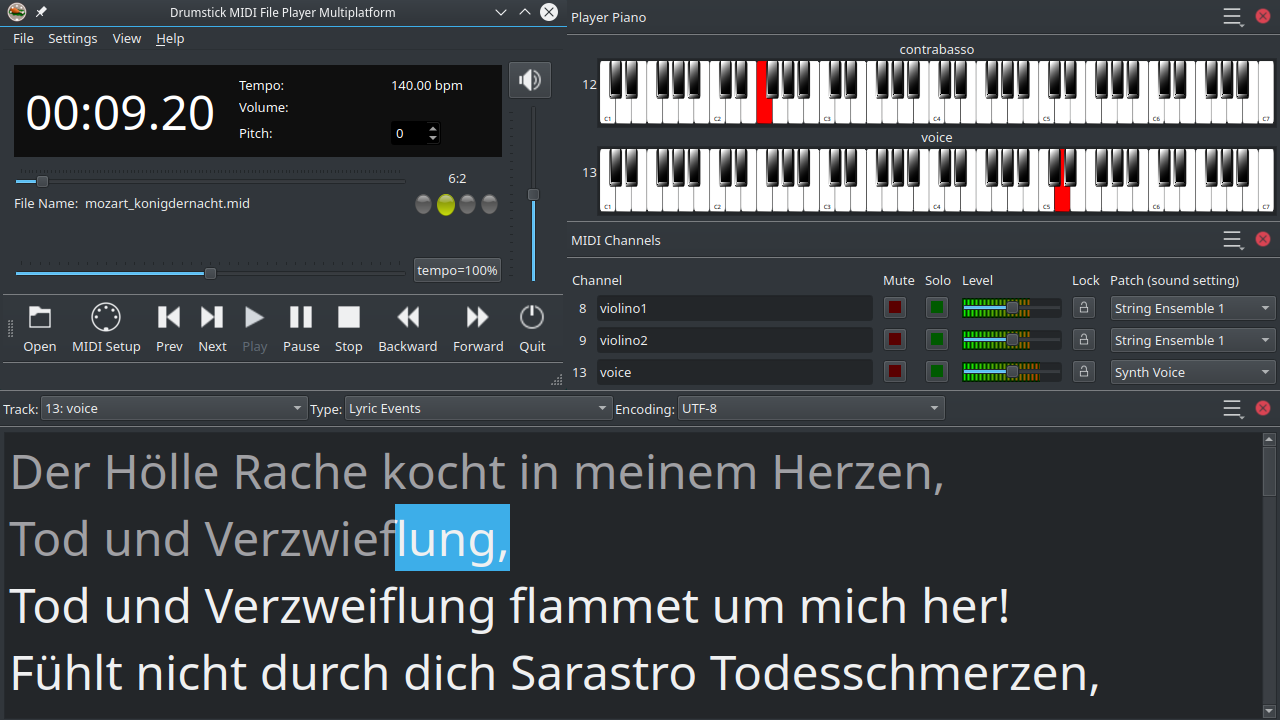
Drumstick Multiplatform MIDI File Player 1.3.0 has been released this week, right after the Drumstick Libraries 2.2.0 and VMPK 0.8.3; business as usual: we write programs, we release stuff. This post is about the first program, a MIDI file player (reloaded). Let's start by the beginning...

10 years ago, there was not a fully featured MIDI file player for Linux. Of course, there was Linux software that could (barely) play MIDI files, but nothing comparable to the vanBasco MIDI Karaoke player (which is a Windows 32 bit application, updated the last time in 2006). This program can be run in Wine, by the way. The key features of the vanBasco player are described in its site, and anyone with a musical background can identify its value, beyond the entertainment use case:

  • lyrics can be displayed in a resizable window or full-screen
  • control window: ability to change tempo, volume, key of song
  • real-time MIDI output window: shows notes, volumes, and instruments, can mute or play solo individual instruments
  • piano view: displays notes on a big piano keyboard

The KDE 4 desktop was starting to become mature and stable at the time, so I've decided to scratch my itch rewriting the old and abandoned KMid  application, adding my favorite features from vanBasco. This was already told on this blog a few times. KMid2 was a total rewrite almost from scratch, with the additional goal to make it multiplatform. Indeed, it was possible to build and run it on Linux, macOS and Windows, but there wasn't an easy way to deploy KDE programs on macOS and Windows at the time, so the only viable target was Linux. On the other hand, because the chosen architecture, it  was difficult to maintain and port the program to other platforms. Then, several Linux distributions boycotted this application, with the total indifference of the KDE community. Good riddance.

Fast forward to the roaring twenties. Nothing changed for Linux. The vanBasco player is still the king in the Windows world. In spite of most Windows 10 users running a 64 bit Operating System, vanBasco is rotting its 32 bits. The only alternative fulfilling the four mentioned features is Falcosoft MIDI player. I don't know about native macOS alternatives, either. Of course there are players for macOS, and WinAmp for Windows, and even VLC plays MIDI files, but that is not what I'm talking about...

I prefer to avoid hard use cases. Someone asked me once about my VMPK program: how it would be classified? Is it a Game? No, it is not a game, it is a toy! A game has a set of rules that the player must follow to reach the final goal: to win the game. On the other hand, a toy has no written rules. The player can explore, learn, and have fun on its own. No winners, no losers. Sometimes a good game may be repurposed by the users, like Wolfenstein 3D, but it is uncommon. It is in the definition of free software: the freedom to run the program as you wish, for any purpose.

Anyway, here is an usage example for this program: there is a choir, with a conductor or composer that arranges or edits pieces using some MIDI software like Rosegarden, MuseScore, Frescobaldi, or similar. He prints the scores (or exports PDF files for electronic distribution) for the singers. He also exports the pieces as MIDI files, that can be loaded by dmidiplayer, and used by the singers to learn and practice the lyrics and music of each voice. The examples in dmidiplayer include some choral music, edited in Rosegarden and directly exported as MIDI files.

You can download this program for free, either as sources that you may study, modify and build, or an AppImage for any Linux distro, or as ready to install packages for Windows, and macOS, from Sourceforge and GitHub.

There is also a Flatpak available at Flathub. And thanks to deb-multimedia, there are also deb packages for Debian and Ubuntu users.

Saturday, August 27, 2011

Presenting VMPK for Nokia N950

I've been playing with my new and sexy Nokia N950 developer device, and here is the fruit: a newborn VMPK. I've just released a beta for testing, usable but not yet optimized. Please, try it. Your feedback will be appreciated.

Download VMPK & FluidSynth for N950 from sourceforge.net

I've learned two lessons from the Symbian port of VMPK published at Nokia's OVI Store: people expect that if a program looks like a piano, it should sound like a piano. It doesn't matter if the product description says that it doesn't produce any sound by itself. Dozens of comments in OVI Store page confirm that there is no hope that users read the description before downloading a program.

When I was doing some research for the Symbian port, I've discovered that creating sound always used very large audio buffers, no matter the method, producing about one second of latency or more. This is unacceptable for a musical instrument emulation, so network MIDI was the only available option. On the other hand, the Nokia N9xx uses Linux, including ALSA and PulseAudio among other usual infrastructure, so the latency is not a problem and FluidSynth is a perfectly sound complementary addition to VMPK.

Second lesson: an user interface that fits well in the desktop version of the program is barely usable on the mobile phone form factor. The solution is to create a new user interface using QML, the new declarative language for Qt user interfaces. The piano keyboard widget was already built around the Qt Graphics View Framework, so it only required to be wrapped as a QDeclarativeItem subclass and it was readily available as a QML object, to be combined with the Qt Quick Components for Meego library to build the new user interface. Here are some screenshots.

Main page, common controls are shown.

Main menu, note names option activated.

Preferences page.

About page.

Sunday, May 29, 2011

Akademy-es 2011


I've been attending the Akademy-es 2011 at Barcelona last week-end, instead of protesting and making the Spanish Revolution 2.0. It was a pleasure to meet Antonio Larrosa face to face again, after 5 years. We met the first time at Akademy-es 2006, also in Barcelona, where the idea for KMid2 was born. Hugs, Antonio!

My presentation was rejected. I've offered the same paper ("MIDI en Linux") used at the IX Jornadas de Software Libre. As an alternative, they proposed a lightning talk about KMid, but I wasn't interested in this format. My project is not KMid, but KMid is a piece of my project: providing Linux and KDE the MIDI tools that are needed, and this includes KMid, KMetronome, KMidimon, Drumstick, and some more programs.

About the conferences. Some talks were recycled, year after year, like the Valgrind talk by Albert that anyway deserves to be repeated even more times because it is a key tool to enhance the code quality of our projects. Other topics were brand new and interesting, for instance the half-rolling release and bundle system of the Chakra distribution, presented by Manuel Tortosa.

After the meetings, supper and drinks. This is the so called "social program". Everything is social, of course, when a couple of geeks meets to do things together. Saturday supper, I was shocked by a question of one of the attendees. He said to me something like this: Who wants MIDI at 2011, anyway? The answer for this question was in my paper, but he didn't bothered to read it. To summarize: MIDI is not an alternative to MP3, like drawing is not an alternative to photography. Who thinks that every program related to drawing should be banned from KDE? After all, it is a technology invented in the paleolithic era.

Saturday, October 30, 2010

Good times are gone

My sabbatical is over, and all this month I have been busy on a full time job, programming Windows applications in C# for a living. For this reason I have not had much time to devote to open source projects, and the forecast is that this situation will not change in the near future.

In the past few months I have contributed as much as I could to the free software community with MIDI applications, an area I know well and where  there is not too much material, particularly on Linux. Result of this has been KMid2 and Drumstick. I have also maintained my previous projects: KMetronome and KMidimon. About VMPK, this month has beaten their previous records on SourceForge with more than 10000 downloads in October. Thank you very much to all Mac and Windows users who trusted this software, and of course to all participants, contributors and translators who made it  possible. In Debian, the situation is also "fantastic", with 137 installations to date, and only one release late. I have no data on other Linux.

Friday, September 3, 2010

Drumstick Time

A new Drumstick version is in the oven, with two tasty novelties:

1. OVE file parsing support (files created by the Overture program).
The code for this feature has been contributed by Rui Fan. This file format can be played by the included program drumstick-guiplayer, in addition to the SMF and WRK formats. There is also a new drumstick-dumpove CLI utility to inspect the file contents as text.

2. Acquisition of real-time priority, using RealtimeKit.
Until now, the thread processing MIDI input from ALSA tried to acquire real-time priority using the RLIMIT_RTPRIO mechanism, which requires some configuration and administration work. If the above mechanism is not available, now Drumstick tries to acquire real-time priority from RealtimeKit.

This release is scheduled for sometime during next week.

What's next?

At this moment there are two libraries: drumstick-alsa (Linux) and drumstick-file. There will be two more: drumstick-win and drumstick-mac. The foundations of these two new libraries are already implemented in KMid2. On the other hand, it is desirable to unify all the backends for all platforms and file formats under a single set of multiplatform interfaces: drumstick-simple. VMPK will benefit from this, because replacing RtMIDI by Drumstick will be easier to implement features like MIDI file recording, playback and arpeggiator.

Friday, August 6, 2010

Electronic Music Stands

We are in full swing of electronic books, bubbles that are likely to explode into a new phase of the war between the old and new generations of publishers, content providers and consumers. It is likely that sheet music enter the battlefield.

Before proceeding I must warn you about two facts. One: despite the name of the blog, I am a Trekkie. Two: I am not a neutral observer. In my opinion traditional books publishing, as well as media labels, are going to lose. Those not able to adapt to changing times will disappear. Resistance is futile.

The musicians are going to adopt electronic lecterns sooner rather than later. The electronic scores begin to replace the editions printed on dead trees, as is already happening with books. There are some solutions on the market, more or less primitive.

MusicPad: Hardware and software.
How could you describe it? It is like a Kindle with legs. There is a "Master" version with twice the surface. Among its outstanding features: it is completely silent. Great virtue, because silence is also music.

MusicReader: Software only.
"The facto MusicPad Killer", they say. It is a program with Windows and Mac versions, which has more than just a page viewer. There is an optional accessory for turning pages with the foot. It can display half pages enlarged, as an aid to accessibility. Integrated additional functions: recorder, player, metronome and tuner.

eStand: Software for Windows, page viewer.

All of them are readers for electronic formats such as PDF or similar, showing pages, sections or page sets. MusicReader seems the most complete, yet is far from perfect. Some desirable features for an electronic music stand:
  • Pages no, thanks. The pages have no musical function and are mainly a nuisance. No pedal to turn pages, automatic scrolling is much better. Bookmarks, notes, sections, movements, labels, individually numbered bars. Everything indexed and easily searchable.
  • Size does matter. The musicians are supposed to have good ear, but nothing is said about sight. So it is better if the size of the staves is adjustable. For this reason, PDF is not very well suited for scores, it may be necessary to adjust the layout depending on the available area of representation. In this sense, the graphical representation of music resembles the visual organization of the widgets in graphical user interfaces.
  • Content indexing, cross referenced, not only metadata but all the data resulting from semantic content analysis. For example: tessitura of the parts (lowest and highest notes used by each voice and instrument in the composition) for each one of the scores in the library. With this data available, it may be possible to filter the appropriate pieces for different levels of students. Publishers must provide rich metadata, MIDI sequences, critical texts, and musicological analysis. It is not just changing the medium of the product, it is about changing the cellulose based mindset, into another way of thinking based on information.
  • Metronome. Probably many of the users will be students, so it will be convenient to have a metronome at the same place, taking the rhythm meter and the speed automatically from the values in the score. And of course, in addition to the optional audio reference, each bar should be highlighted while playing, keeping the current bar clearly visible in a central position, taking control of the scroll function, even when the metronome is quiet. Something like this.
  • Pitch tuner, recorder, playback. Computer: add an accompaniment. Computer: change the clarinet by an oboe. Computer: pause recording ...

Star Trek TNG 6/8: "A Fistful of Datas"
  • High connectivity: USB, Bluetooth, WiFi, Ethernet ...
  • If there is a small or large group of musicians, they may want to synchronize the electronic stands, loading and unloading documents and synchronizing the timers/metronomes.
We already have almost all the required technology as free software:
  • Music Typesetting, engraving PDF or PostScript scores: Lilypond.
  • Programs, libraries and components to display these documents: Okular.
  • Sequencers, synthesizers and MIDI players: KMid.
  • Free content: www.mutopiaproject.org

We have the opportunity to occupy a niche in musical education, and from here future musicians shall develop the habit of using free software. Perhaps with time, even to generate free content.


Star Trek Voyager 5/22: "Someone to Watch Over Me"

Saturday, July 24, 2010

Future of KMid

The next version of KMid is in the kitchen right now, and it will have 2.4.0 as identifier. Tentatively, August 15th shall be the release date.

The main novelty is KMidPart, a component that implements the interface KMediaPlayer, playing MIDI/Karaoke files and using KMid infrastructure. The component shares the same configuration as the main program, so by default the MIDI port selection and Soft Synth will be common. This component by default shows only a play/stop combined button and a slider for the time position, in addition to the actions Play/Pause/Stop. Hidden, but selectable by means of KMediaPlayer::View interface methods, there are several additional controls: pause button, volume, pitch transpose and tempo (speed). The following pictures show the minimum and complete user interface respectively.


Once installed the new version of KMid, the KMidPart component is immediately available in Konqueror, either as file manager or web browser, since it is a simple standard KParts/ReadOnlyPart service. Examples of web sites that can benefit from this component can be anaigeon.free.fr and greekmidi.com.

Of course, this component is available to all fellow KDE developers so they can include MIDI playback in other programs. The programming API is quite simple, as demonstrated by two examples in C++ and Python included in the examples directory. If the KMediaPlayer interface is not enough, there are other methods and additional signals available through DBus.

From here, KMid will continue to evolve. I am considering further integration with KDE desktop technologies. For example, standard MIDI files are not scanned or indexed currently, but much of their metadata could be exploited with Nepomuk: tonality, rhythm, tempo, number of tracks and instruments. The settings of the songs, now stored in individual text files, may also be candidates for better integration. Another candidate for integration would be Solid, publishing system MIDI ports. Integrating KMid backends in Phonon can not be addressed at this time, but maybe in the future Phonon may evolve and such integration become possible.

Further integration into KDE unfortunately means less chance for KMid users of using it on Windows and Mac OSX. Although there are ports of KDE for those operating systems, both communities are not very active. I have received a suggestion that KMid does not need to depend on KDE, but only Qt4. This would make possible to distribute KMid binaries for Windows and Mac easily. I'm not especially interested in this option, followed for instance by the Rosegarden project, sacrificing both functionality and community by this way.

Saturday, June 19, 2010

D-Bus in VMPK

Yesterday, I've released VMPK 0.3.2 with a new D-Bus interface. VMPK is not a KDE application, it uses only Qt4, so a D-Bus interface wasn't included by default. This VMPK feature is far from perfect, and it will require some improvements in future releases, but it is a start.

What can be done with this D-Bus thing? D-Bus provides a mechanism to send and receive messages between processes (it is an IPC, inter process communication mechanism). This allows one application to be controlled from another one, or from a script. This is the classic application automation scenario solved in Windows with COM/DCOM, and in Mac OSX with AppleScript. D-Bus is a cross platform solution, with nice Qt4 bindings: the module QtDBus. The Qt4 SDK for Windows doesn't include this module, and anyway the bus daemon and libraries are external dependencies. D-Bus has been adopted in Linux by the KDE and Gnome desktops replacing other former solutions.

As use case demos, in a directory named "dbus" of the VMPK source tarball, there are a Bash script playing a simple tune and two Python scripts showing how to remotely execute actions and receive signals from VMPK. Another interesting use case for this D-Bus interface is to define new hot keys to send MIDI messages using VMPK. For instance, let's define Alt+S to send a sustain=100 control change, and Alt+Z to send sustain=0. Here is a brief how-to for the KDE desktop.

To configure hot keys in KDE, run the program "Personal Settings (Configure Desktop)", and select "Computer Administration" -> "Input Actions", or launch the command 'kcmshell4 khotkeys' from a terminal. Here you can create a new group with the name "VMPK", and two new actions (new -> global shortcut -> D-Bus command) for your controllers. Name your actions for instance "sustain on" and "sustain off", and assign the key strokes in the tab labeled "Trigger". In the tab "Action", the data for "sustain on" is:

Remote application: net.sourceforge.vmpk
Remote object: /
Function: controlchange
Arguments: 64 100


The arguments are a pair of numbers, first the controller number, and then the control value. 64 is the sustain (hold1) controller, and 100 is the value. The arguments for the "Sustain Off" are "64 0".

You must activate the check boxes in the actions tree, to enable the new hot keys. You can also set conditions for the group, for instance checking that the window title or class matches the VMPK main window.

Note that you need to compile VMPK with ENABLE_DBUS activated. The binary packages for Windows and Mac OSX don't have this option enabled.

Binary packages? didn't say I something about stopping to ship binary packages of my programs? Yes, there are no binary Linux packages for this VMPK release. The question is that I can provide a single VMPK package for Windows that includes all dependencies (a few Qt4 and runtime DLL), and this package runs in XP, Server, Vista and Windows7. Same for Mac OSX, where I can provide a single application bundle compiled in Universal mode (x86 and PPC) including all the dependencies as well. The burden for Linux is the existence of RPM and DEB package types, with differences among several distros, and several versions, and processors, and whatever. VMPK is provided by several major distros already. If it is not yet included in your distro, open a request in the distribution tracker or compile it from sources.

Friday, May 21, 2010

Weird KMetronome

After a long development cycle focused almost exclusively on KMid, it's time to give some love to other projects. I've been working lately on KMetronome, a MIDI metronome for KDE and ALSA. It is the oldest project of my little family.

The only issue in KMetronome's tracker is this one year old request, which has suggested the title of this post. The "Weird Metronome" is a popular simple MIDI metronome for Windows, which is the origin of "Open Metronome".

The major advantage of Weird / Open Metronome is the definition of rhythm patterns. The drawback is that it only works on Windows. It may be a good idea to make a Linux port. His definition of patterns is very simple and elegant, if somewhat limited. It has two branches: one producing MIDI events, and the other producing digital audio.

Although I can't rule out porting Open Metronome to Linux in the future, I've decided to implement the pattern editor differently. Here are some screenshots of the upcoming version 0.10 of KMetronome, dressed in Skulpture style.

Settings

Like KMidimon and VMPK, now KMetronome also uses an instrument definition file in .INS format, the same format as Qtractor, TSE3, Cakewalk and Sonar. I've added an "Output instrument" drop-down list in order to choose one among the standard General MIDI, Roland GS and Yamaha XG drum maps. You can add more definitions creating a file named "drums.ins" at $HOME/.kde4/share/apps/kmetronome. The options "Bank", "Program", "Weak note" and "Strong note" are now drop-down lists as well.

Main Window

There is a new button "Patterns" opening the rhythm pattern editor, and a drop-down list to choose the pattern. The default "Automatic" value means that the program generates the pattern as usual, using the notes set in the configuration dialog (Strong / Weak) and the rhythm definition provided by "Beats / Bar" and "Rhythm figure". The same drop-down list contains also the names of the user-defined patterns.

Pattern Editor

This is a new dialog box. You may edit, test and select patterns with it. To create new patterns, you simply save the current definition under a new name. Patterns are represented by a table. The rows in the table correspond to the percussion sounds. You can remove and add rows from a list of sounds defined by the instrument settings in the configuration dialog. The number of columns in the table determine the length of the pattern, between 1 and 99 elements of any rhythm figure.

Each table cell accepts values between N = 1 and 9, corresponding to the MIDI velocity (N * 127 / 9) of the notes, or 0 to cancel the sound. Valid values are also "f" (forte) and "p" (piano) corresponding to variable velocities defined by the rotary knobs (Strong / Weak) in the main window. The cell values can be selected and modified using either the keyboard or the mouse. No need to press the stop button before modifying the cells ...

This version is not ready yet, but will be probably published by the middle of next month. For now, you can get the sources from the Subversion repository. You need to install Drumstick before compiling it.

By the way, I'm planning to stop distributing binaries for all programs. If you like them and your favorite Linux distribution does not include Drumstick or KMetronome, it would be a good idea to start opening bug reports in its  enhancement request system, or sending messages to the distribution's mailing lists or web forum.

Monday, April 26, 2010

Apples and Oranges

KMid is now a multi-platform application for Linux, Windows, and Mac OSX. It may be the right time to make a comparison between the different operating systems with regarding to the development of KMid backends.

First, the functional components needed by a KMid backend

  • Read and parsing of SMF: MIDI and Karaoke files. This mechanism must offer not only timestamped MIDI events, but also the metadata (for instance, song lyrics) embedded into the SMF data.
  • Facility for sequencing MIDI events. Events read from a file are labeled with timestamps, to be delivered to MIDI synthesizers at the right times, handling also common player actions like play, pause and stop.
  • Internal and external, hardware and software MIDI synthesizers. The main goal of KMid is to support external musical instruments, but as many potential users do not have one, it is interesting to be able to use software synthesizers, in a transparent way without complicating the program design.
Organization of the backends

KMid::Backend is modelled after several Phonon interfaces. There is not a dependency on Phonon, only inspiration and Copy&Paste. There is a KMid::MIDIObject abstract class that resembles more or less a Phonon::MediaObject, encapsulating the sequencer functionality, and a KMid::MIDIOutput class representing a MIDI output port, similar to Phonon::AudioOutput. Main differences are:

  • KMid::MIDIObject time is measured in musical time (ticks) instead of milliseconds. Some additional properties: timeSkew, textEncoding, lyrics. Several signals, one for Each MIDI event type and metadata, feeding the program's graphic interface animations: lyrics highlighting, visual metronome, channel meters, and piano player keys.
  • KMid::MIDIOutput has pitchShift and midiMap properties. Volume and mute properties take a MIDI channel argument. There are also some real-time MIDI event slots, one for each MIDI event type, used by widgets like the channel instrument selectors or the piano player keys when they are triggered by the mouse or the computer keyboard.
Linux

ALSA provides a very advanced MIDI sequencer. The API is big and cumbersome to use in a KDE program, so I've developed a library layer, named "drumstick-alsa", providing a C++/Qt4 wrapper around it. ALSA does not provide a mechanism for reading and parsing MIDI files, so there is another library named "drumstick-file" taking care of it. In ALSA, MIDI hardware and software clients are all equivalent and there is a routing mechanism between MIDI OUT and MIDI IN ports, fully transparent and very powerful, where either of the two ends of the connection can be a program or a MIDI device driver. Of course, the data transmitted by the communications connection uses the standard MIDI protocol. KMid creates a MIDI output port externally visible, to be connected to a MIDI synthesizer, and also private loopback ports (input and output) which are used for visual feedback in the graphic interface (highlighted lyrics, metronome, piano keys...) The MidiPlayer class schedules MIDI events to a loopback port, which are received in time and propagated activating the signals emitted by the MIDIObject class and at the same time are sent through the MIDIOutput class to their final destination, which is any kind of MIDI synthesizer.

Any software synthesizer that is also an ALSA sequencer client can be connected to the MIDI output of KMid. Although not strictly necessary, for the users convenience it is possible to enable and launch FluidSynth or TiMidity++ on KMid's initialization. Unfortunately, a software synthesizer receives MIDI events and converts them into digital audio, and here  is where some users may find problems that go beyond the scope of KMid (ALSA/Jack/OSS/PulseAudio..., you know). In addition, a software synthesizer may require soundfonts. Enough to say that Linux distributions should package and integrate all the components that the users may need. The owners of external MIDI musical instruments are lucky, because they are quite well supported by ALSA.

Windows

The operating system provides the same MIDI support since the days of Windows 3.1 practically without any changes. Windows cannot connect the MIDI output from a program to the input of another program, only to a system driver, so the synthesizer must be external, or having a device driver, or using MidiYoke or any other similar solution. However, Windows provides a software synthesizer unconditionally installed and activated, so the Windows backend does not have or need a soft-synth configuration page.

The MMSystem API does not provide virtual MIDI ports, nor transparent MIDI routing, so the strategy of playing to a loopback port as in Linux is simply not possible. What is possible is to use "custom" midi events and define a callback function that is invoked whenever the time arrives to play a scheduled MIDI event. This is how all the visual feedback is implemented. The system libraries do not provide reading and parsing of MIDI files, so drumstick-file is used.

Mac OSX

The operating system provides all kind of MIDI support services, starting with reading and processing of MIDI files. If we compare the AudioToolkit SMF processing API with drumstick-file, the latter provides a model similar to XML-SAX, while AudioToolkit would be similar to XML-DOM. After reading the MIDI files, the results are explored to extract the required metadata, and an additional track is added containing the "custom" MIDI events for visual feedback.

Virtual MIDI ports are fully supported, with routing and full transparency between applications and devices, so the loopback port strategy works exactly the same as in Linux/ALSA. The Apple software synthesizer is an object of type "AudioUnit", and requires activation before a program can use it, so the Mac OSX backend has a simple soft-synth configuration page. The DLS soundfont provided by Apple is made by Roland, like the Windows one.

Conclusion

The LOC numbers needed to implement each backend are very similar: mac = 2358, windows = 2435, alsa = 2715 (not counting drumstick), and its complexity is also similar. Despite the different features offered by each platform, it is possible to implement KMid backends presenting the same programming interface to the application. We can create new backends in the future using the existing ones as models, or duplicating the "dummy" template that exists in a directory with the same name in the source repository.

Saturday, April 17, 2010

KMid in Windows


KMid is aimed at a wider audience in this next version. This song was generated with MMA (Musical MIDI Accompaniment), and it is included as a new example.

Thursday, April 15, 2010

History of KMid

KMid was originally created by Antonio Larrosa. According to his website, the exact birth date was the 11th of September of 1997.

KMid initially ran in Linux and FreeBSD using the OSSv3 MIDI sequencer. The release 1.0 coincided with the KDE1 publication in 1998, and version 2.0 with KDE2 in 2000. It was ported later to KDE3. Version 2.0 and was functionally very similar to KMid2, having already ALSA support.

I've started using KDE by 2002, along with the initial KDE3 releases. At that time I also became involved in the development of Rosegarden, a KDE program for music edition using MIDI technology, and used KMid frequently. The main drawback was the inability of teaming KMid with other ALSA sequencer based programs, because the play/pause/stop actions created and destroyed KMid's MIDI ports, preventing reliable external connections made by other programs like aconnect or qjackctl.

In Akademy-es 2006, that was held in Barcelona, I met Antonio and explained him my concerns about KMid, and subsequently exchanged some patches by email trying to solve the implementation of libkmid regarding the ALSA sequencer. However, any solution explored involved binary incompatibilities, so the issue was out of the question within the KDE 3.5 development cycle.

On the other hand, KDE4 development started and OSSv4 was published, so there was no need to support OSSv3 anymore. The transfer of KMid in the SVN repository from kde-multimedia to extragear provided more time and freedom to rethink the software architecture and develop a new implementation.

KMid2 was developed as a revamping of the original KMid, with the following main features and goals:
  • Playback to external MIDI devices.
  • Allow to use software synths as well, like TiMidity++ and FluidSynth.
  • Change tempo and volume controls. Add a key (transpose) control.
  • Independent MIDI channel mute control.
  • Support for many character encodings for lyrics, and configurable fonts.
Additional short-term goals:
  • Remove the deprecated OSSv3 /dev/sequencer interface support, dropped from OSSv4 anyway.
  • A fair ALSA sequencer backend implementation: do not create/destroy the client and port instances on each play/pause/stop action. This enables the usage of a MIDI Patch Bay application like aconnect or qjackctl.
  • More native backends for other platforms.
Version 2.2.2 was released on March 15th, 2010, closing the initial implementation cycle. The next release 2.3.0 will be published within a few weeks, including new native backends for Windows and Mac OSX.

Thursday, April 1, 2010

KMid in Mac OSX

This is not an April Fool's joke. KMid is running in Mac OSX, native:


I've developed KMid's Mac native support using Fink, that includes KDE SC 4.4.1

By the way, there are fresh news at Fink web site: "Effective 1 May 2010, we are going to cease work on our Mac efforts, and switch to development for the iPad, iPhone...". Oh, wait! today is April 1st...

Now seriously. You need: Xcode 3.1.4, that provides GCC 4.2
And some dependencies from Fink: kdelibs4-mac-dev, kde4-buildenv, cmake. These packages require some other dependencies.
Recommended: bundle-kde4-mac. This set is very large, and includes everything for a complete KDE environment.

KMid doesn't use Phonon. The native Mac OSX backend uses CoreMIDI and CoreAudio, and the Apple DLS soft synth enabled by default. Everything is included in OSX. Receipt:

1. Get the sources from the repository:
$ svn co svn://anonsvn.kde.org/home/kde/trunk/extragear/multimedia/kmid/

2. Prepare the build environment:
$ export KDE4_TYPE=mac
$ source /sw/sbin/kde4-buildenv.sh

3. Configure, compile, install:
$ cd kmid
$ mkdir build
$ cd build
$ cmake .. -DCMAKE_INSTALL_PREFIX=/sw/opt/kde4/mac -DBUNDLE_INSTALL_DIR=/sw/opt/kde4/mac/bin
$ make
$ sudo make install

Enjoy!

Thursday, January 28, 2010

Loving Music

I love music even more than I love computers. And here is a new KMid2 release, for all the music and KDE lovers. It has several new features, but that is something that you can read in the announcements or the ChangeLog. There are also four new songs replacing the old examples coming from the original KMid. It was not clear the license of those files, so I've created new ones. Like the two first examples (Ay Linda Amiga and Mozart's Ave Verum) the songs were edited in Rosegarden, more or less tweaked, and finally exported in SMF format. The sources of all the songs are the scores published by the Mutopia project. The LilyPond process that creates the beautiful PDF scores also produces MIDI files that have been imported into Rosegarden as the foundation for the final products. Here are the addresses and references, and one rendering as audio.

Schubert (1797-1828): Ave Maria (Ellens dritter Gesang)
Mutopia score
Wikipedia article

The following rendering has been produced in FluidSynth using the General User soundfont.


Mozart (1756-1791):
Der Hölle Rache kocht in meinem Herzen (Die Zauberflöte / The Magic Flute - No. 14 Arie)
Mutopia score
Wikipedia article

Dies Irae (Requiem)
Mutopia score

Handel (1685-1759): Hallelujah (Messiah)
Mutopia score

Thursday, January 21, 2010

MP3 killed MIDI?

Of course not. At the turn of the 20th century everybody was saying that photography killed painting. And later cinema killed theatre, and television killed cinema. The last technological revolution, the digital one, killed the business of the record companies. And this time, it may be finally true...

MIDI is about making music, and making music is about musical instruments. After all, a business that remains still alive is the musical instruments industry. Not all the musical instruments sold around the world are bought by professional musicians. Most of the market are aficionados and hobbyists. Everybody would like, in one or another point of the life, to become a musician, or learn to play a musical instrument. Well, this is the place of the MIDI software in the desktop ecosystem. It is not about passively listening music, but using tools to inspect, interact, learn, modify, understand music. That may explain how VMPK had more than 5000 downloads from SourceForge last month. Even when it is not able to play songs by itself!

There was once a day something called "Pianola", a piano player product manufactured by the Aeolian Company. It was so popular that the trade mark has been adopted in Spanish (and in other languages as well) as a generic name, and entered the official dictionary. The company ended in bankruptcy about only 25 years ago, but the idea behind it still exists. The Disklavier models by Yamaha are offering today a similar functionality, but using MIDI files instead of punched paper rolls.

Well. All the above small talk was, of course, an excuse and introduction for another KMid post. The next week there will be a new release (0.2) of the program, after some changes triggered by an usability review. Big kudos to the KDE usability team and Diego Moya for his report! One of the new included features is the ability to launch soft-synths (TiMidity++ or FluidSynth) from inside KMid2, as child processes. The communication between KMid and the soft synths is handled by the ALSA sequencer, using the standard MIDI protocol. This has two consequences: the soft synths are still loosely tied optional dependencies, and the program is still able to communicate with external musical instruments, hardware synths, or many other soft synths, which is a very important feature for me. This also means that KMid is still for Linux only, because ALSA is only available for Linux (the Salsa library has only very basic ALSA features, and it is not enough for KMid).

There will be in the future other backends for KMid. I'm planning native backends for Mac OSX and Windows, using the native MIDI subsystems of each operating system, and also a backend based on libfluidsynth, which may be very comfortable for casual users, and available for more platforms.

Tuesday, December 22, 2009

MIDI on Linux is not easy

I've put a little tutorial in the KDE userbase wiki about MIDI on Linux because Linux users have very little help setting up their systems for MIDI usage.

First, I would like to apologize for a joke, that was not my original idea. I've found it at the renaissance music web site of Alain Naigeon. He says that MP3 is like fast food, WAV is tasting the meal, and MIDI is cooking the recipe. He also says that playing a MIDI file is not reproducing a performance, it's a new performance. I agree, but on the other hand each MIDI file is a recording of a musical performance. Even more than a MP3 or a CD, because it contains no sound, only the musician actions. For instance, the folks at the Minnesota International Piano e-Competition distribute MIDI files of the competitors' performances, recorded in Yamaha Disklavier concert grand pianos, as standard MIDI files. And you can play these files in KMid2. Try this one: Igor Stravinsky's, Petrouchka played by Alessandro Taverna, first prize winner of this year's contest.

Returning to the subject. I would like to show you a screenshot of the about dialog from the software synth included (and ready to be used out of the box) in all MS Windows operating systems:


The Roland Sound Canvas samples are also included in Mac OSX. In both cases it is a small sound font  file in DLS format. It is not the full and great Roland Virtual Sound Canvas, but a light version. Anyway, the point is that both software manufacturers provide resources to the users wanting MIDI support out of the box. If you download and install VMPK in any Windows version, you can start playing and getting sound at once without having to configure anything at all, and without reading a single word of system documentation.

What is the situation on Linux? There are MIDI applications. There are many operating system MIDI drivers (ALSA). Some software synths and free SoundFonts are also available. What is missing? Distributions gathering all the required pieces, putting them together and easing the task of setting up Linux for MIDI usage out of the box. It is their job, after all.

Monday, December 7, 2009

Precompiled Headers

Hello, KDE Planet!

Let me insist with another post about time. But in this case about the time spent compiling programs; always too much, because vita brevis est.

I've added to KMid2's build system a CMake script enabling precompiled headers (PCH) for the GCC compiler. It is optionally enabled using a  CMake option "-DWANT_PCH=yes". I've written this script initially for Rosegarden, and later it has been refined and included in several other projects with the goal of reducing the build time.

Enabling PCH for a project is not automatic. You need to write a header file including enough library headers, and give this big header to the ADD_PRECOMPILED_HEADER macro. It is also a good idea to use ADD_DEPENDENCIES in the targets, to ensure that a PCH file is generated before the target components. The macro automatically adds an "-include" argument to each compilation step in the directory,  so PCH can be enabled or disabled for a project without needing to modify the sources.

The trick is creating the big header file with enough #includes to be worth, but not too much. Compiling the PCH file takes not only time, but also many megabytes of disk space. For KMid2 this header is named "qt_kde.h" and includes mostly Qt and KDE headers, and also several Standard Library and ALSA includes.

From my development machine, here are some measures comparing compile times, with and without PCH.

Without PCH
real    1m44.137s (104137 ms)
user    1m25.417s
sys     0m8.149s

With PCH
real    1m21.081s (81081 ms)
user    1m10.732s
sys     0m8.641s

KMid2 is a very small application. For comparison, Rosegarden 1.7 needs between 11 and 15 minutes to build in the same machine. The savings in KMid2 using PCH are 23 seconds, 22.14%. Not too bad! But KDE's build system has another way to save compiling time, and it is ready out of the box for any KDE project using the CMake option   "-DKDE4_ENABLE_FINAL=yes". This setting creates a Single Compilation Unit for each target. Times measured for KMid2:

With ENABLE_FINAL, and without PCH:
real    1m19.808s (79808 ms)
user    1m14.025s
sys     0m4.932s

Savings: 24.329 seconds, 23.36%

Conclusion: ENABLE_FINAL is slightly better than PCH, and it can be  automatically used by all KDE4-based applications. So why bother with PCH? I think that PCH may win if you can use the same PCH file when compiling a whole set of KDE programs at once, but I've not tested this hypothesis yet...

Thursday, December 3, 2009

Parallel Lives

Plutarch was a Roman-Greek historian and biographer, well known because of his work "Parallel Lives", a series of biographies of famous Greeks and Romans, arranged in pairs to illuminate their virtues and vices. I wanted to try a similar approach pairing some digital audio and digital image technology citizens. But the vices and virtues only apply to the computer users and developers, because the technology, like the science, is neutral.

Let me start before the computers epoch. At some point in the past, painting was the only way to fix an image in a 2D surface. The sound, on the other hand, was impossible to fix in a literal way. Only using a symbolic music language, the same used today (musical scores). In the 19th century appeared the photography and the phonograph. At this point there were two artistic approaches for taking images: painting and photography. Music has a similar duality: it is still possible to “draw” scores, and also to take snapshots of musical performances to be preserved and later reproduced literally. Of course there are non-artistic usages of photographic and phonographic recordings, as well.

Let's stop here a moment. After the photography birth, nobody really has any doubt about the future of the plastic arts. Today, we all enjoy with paintings, children learn to draw and paint, and architects and engineers use technical drawings in their daily jobs. And there is also photography, with artistic and non-artistic branches. We have specific tools in our computers to fulfill all the tasks related to the images. There is Krita and Karbon14, GIMP and Inkscape, Photoshop and Illustrator. For each digital image program there is a vectorial drawing one. There is also CAD software, of course, and ray tracing. More about this later.

Bitmap (raster) graphics are digital representations of 2D images. A digital bitmap is a matrix of pixels (dots), each pixel representing the color (and sometimes transparency) for a point. Different resolutions, or pixel density, are measured in pixels by length unit. Common resolutions are 100 dots per inch, for display devices, and 600 dpi for printers. We can calculate the size in bits of a picture in bitmap format if we know the pixel size and the with and length in pixels of the picture. For instance, an image of 50x20 pixels in true color, 24 bits per pixel, weights exactly 50*20*24 = 24000 bits = 3000 bytes. It is not possible to make a similar calculation for a vectorial image, as the size depends on the complexity and details of the drawing, and not the dimensions.

Digital audio is represented in PCM (pulse code modulation) format as a stream of samples. Each sample is a measure taken by a microphone in equal instants of time. Resolution, or sampling frequency, is measured in samples per time unit. For instance, in Hz (samples per second). Common resolutions are 44100 Hz for CD quality recordings, or 96000 for higher quality. We can calculate the size of an audio recording knowing the number of channels, the sample size, sampling frequency and time length. For instance, a recording of 1 second of monaural (1 channel) sound, using 24 bit samples at 44100 Hz takes 24*44100*1*1= 1058400 bits = 132300 bytes.

Both bitmap graphics and PCM digital audio recordings are usually compressed to reduce it's weight. Some of the compression methods also discard the less relevant information. The JPEG and the MP3 formats are examples of lossy compression. Uncompressed formats are for instance BMP and WAV. Lossless compression examples are PNG and FLAC.

Vector graphics are stored in several file formats. A modern standard is SVG, based on XML. There is also a XML-based music representation, called MusicXML. A very common music format, part of the MIDI standard is SMF (Standard MIDI File) using the .MID filename extension. Vector graphics need to be rendered into bitmap graphics before being displayed, using a rendering graphics library as Cairo. Same happens with the MIDI music, rendered into audio with a synthesizer.

Vector graphics are usually schematic, not very photo realistic. But there are some ray tracing programs allowing photo realistic rendering of a symbolic textual vector graphics source. Something similar happens with MIDI rendering using samplers, producing orchestral music with high level of realism. But many MIDI synthesizers usually leave a very characteristic electronic timbre.

When you render an empty vector graphic (say, a simple white surface) into a bitmap, you can realize that the size of the resulting rendering doesn't depend on the image contents, while the size of the original vector graphics image does. Same with MIDI. If you create a MIDI file of John Cage's composition 4'33'' (which is absolute silence), it will take only a few bytes. The rendering into digital audio weights several megabytes uncompressed. The same size taken by 4 minutes and 33 seconds of a jazz song.

About the transformations. The name Scalable Vector graphics already hints one of its strengths: scalability. You can resize a vector graphic without losing quality, in contrast to a bitmap graphic resize operation. In digital audio, the only dimension is time. You can change the speed, the tempo of a musical composition in MIDI format without losing quality at all. Or you can transpose a song, lowering or rising the notes' pitches. In digital audio you can do those transformations (time stretch and pitch shift) using a FFT (fast Fourier transform) algorithm, but it usually creates artifacts. You can do more transformations in MIDI: mute one instrument, or change it for another one. Adjust the volume of an instrument, or even individual notes.

There are also deep differences in computer support for these technologies. Digital audio is very well supported, like bitmap graphics. Vector graphics are also very well supported, and since the adoption of the SVG standard, it has been very beneficial for Graphic User Interfaces. MIDI is, by contrast, really bad supported, both for hardware and software. Modern graphics cards include 2D and 3D acceleration, and graphics libraries like Cairo and Qt4 obtain a real benefit of the hardware enhancements, and the graphics acceleration is being increasingly adopted by most computer manufacturers and software vendors. On the other hand, audio hardware interfaces have been dropping MIDI support, which was never very good (remember the old cheesy sound of MIDI files?) And Linux distros don't include an easy to use software synthesizer. Both Windows and Mac OSX include a software synthesizer ready to be used out of the box, including the Roland SoundCanvas (lite) SoundFont, which is not a beast but has reasonable quality. Meanwhile, the Linux distros don't care about that. And what about MIDI software? OSSv4 dropped MIDI support. The ALSA sequencer is very good, but needs more good applications.