Showing posts with label FluidSynth. Show all posts

Wednesday, September 22, 2021

New Releases and the New Picture

A new batch of releases from the last weekend: Drumstick libraries 2.4.0, Drumstick Multiplatform MIDI File Player 1.5.1 and Drumstick MIDI Monitor 1.1.0 are out, and here are the main changes for each one:

Drumstick Libraries v2.4.0:

  • implemented ticket #29: RIFF RMID file support. New utility dumprmi, and guiplayer updated.
  • implemented ticket #32: missing library version functions in File and RT libs
  • implemented ticket #33: versioninfo object for windows libraries
  • Enabled by default the internal reverb on macOS DLS Synth
  • Avoided hardcoded font family name in vpiano

Drumstick Multiplatform MIDI File Player v1.5.1:

  • Fixed GH ticket #6: The dependency target "update_helpfiles" of target "dmidiplayer" does not exist. The pandoc utility is optional again.
  • Fixed error checking of DwmGetWindowAttribute() call. This caused a problem in Windows 7 running the "Windows Classic" theme.
  • Support for RIFF MIDI files, provided by Drumstick 2.4.0
  • Czech manual updated, thanks to Pavel Fric

Drumstick MIDI Monitor v1.1.0

  • Removed warnings building with Qt >= 5.15
  • MIDI texts/lyrics encoding defaults to Latin1
  • New options: Qt Style, Dark mode, and internal icon theme based on breeze
  • CMake version >= 3.14
  • Added SCM Revision to the about box
  • Fixed file info dialog (initial tempo, ...)
  • Support for RIFF RMID (.rmi) file format

A common point for all the above is the RIFF MIDI file format support. Citing the LOC:

It is a wrapper format for MIDI data, as first specified by Microsoft, and later extended by MIDI.org (an arm of the MIDI Manufacturers Association) to permit the bundling of both MIDI files and Downloadable Sounds (DLS) files. According to Multimedia Programming Interface and Data Specifications 1.0, August 1991.: "The 'RMID' format consists of a standard MIDI file enclosed in a RIFF chunk. Enclosing the MIDI file in a 'RIFF' chunk allows the file to be consistently identified; for example, an 'INFO' list can be included in the file."

The RIFF format specifications were published in 1991 in Microsoft Windows Multimedia Programmer's Reference, with a brief section devoted to RMID (8-31). The extended specification that documented how both MIDI and downloadable sounds could be bundled in an RMID file (technical note RP-029, "Bundling SMF and DLS data in an 'RMID' File"), was published by the MIDI Manusfacturers Association (MMA) in 2000. The co-authors represent IBM Research, Kurzweil, Microsoft, and Sonic Foundry. In 2001, MMA published the XMF_1_0 specification, which they now prefer to RMID.

The implementation in Drumstick::File offers read-only functionality, and requires the existing SMF class to process the MIDI data portion. The DLS processing is missing, because I've been unable to find a single example of usage, and I suspect that nobody has used it in the real world. Anyway, there is a new utility 'drumstick-dumprmi', which is similar to the other commandline utilities printing the file contents as text in the terminal, with the extra functionality of extract/convert the MIDI data into a standalone SMF file.

Last month was published another utility: wrk2mid v1.0.0 which converts WRK Cakewalk files into SMF. This is something that can be done in Windows using the program Cakewalk by BandLab, which is gratis as a beer, but 'wrk2mid' can be compiled and run on Linux and macOS, so maybe it could be useful for someone. I don't expect to see it on Linux distributions any time soon, though. See: https://wrk2mid.sourceforge.io/

There was a post from 2014 with a diagram of the relationship between the Drumstick libraries v1.0 and applications at the time. Now, all my applications depend on Drumstick v2.x and there are new ones too, so may be this is a good time to paint the new picture...
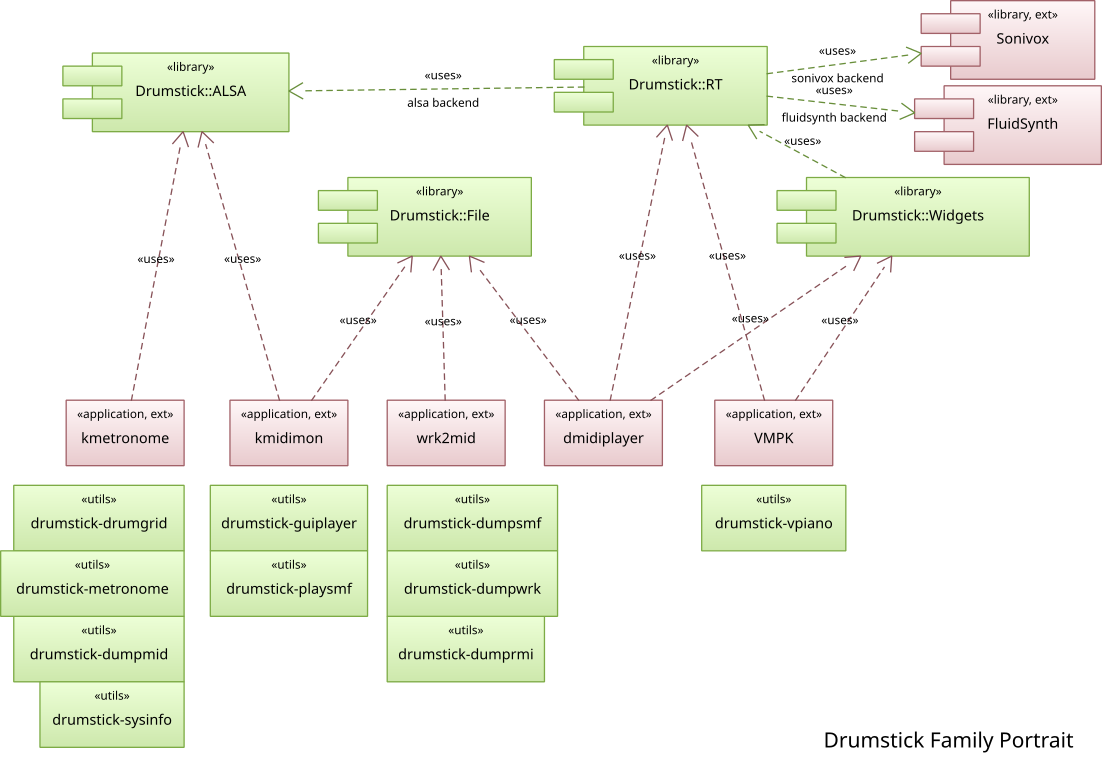
The new picture

The new picture

It is a pending subject to renew the repertoire included in dmidiplayer as sample songs. Here is a future one, rendered on macOS (Mojave) using dmidiplayer v1.5.1 with FluidSynth v2.2.3 and GeneralUser Soundfont.

The song is "Negra Sombra" with lyrics by Rosalia de Castro (1837-1885), published in 1880 in her book "Follas Novas", and music by Xoan Montes (1840-1899), a composer from my own birthplace (Lugo). The song was premiered in La Habana, Cuba, in 1892. You may recognize the melody if you like choral music, or because an arrangement by Carlos Nuñez and Luz Casal was included in the soundtrack of the Spanish drama film "The Sea Inside" (2004, Spanish: Mar adentro). This rendition is derived from a score and MIDI sequence by Lalus fecit edition 2013 licensed as CC-by-nc-sa.

Publishing this song at YouTube triggered the algorithm claiming it as a copyrighted work by Sony. I am not monetizing my videos at YouTube so it doesn't matter in practice, but it bothers me a lot so I'm disputing the claim. Google and Sony are taking a work that is in the public domain, and they are appropriating it. That may be seen as criminal conversion, or at least cultural appropriation.

Sunday, April 3, 2016

Taking Back From Android


Android is an operating system developed by Google around the Linux kernel. It is not like any other Linux distribution, because not only many common subsystems have been replaced by other components, but also the user interface is radically different based on Java language running into a virtual machine called Dalvik.

An example of subsystem removed from the Linux kernel is the ALSA Sequencer, which is a key piece for MIDI input/output with routing and scheduling that makes Linux comparable in capabilities to Mac OSX for musical applications (for musicians, not whistlers) and years ahead of Microsoft Windows in terms of infrastructure. Android did not offer anything comparable until Android 6 (Marshmallow).

Another subsystem from userspace Linux not included in Android is PulseAudio. Instead, OpenSL ES that can be found on Android for digital audio output and input.

But Android also has some shining components. One of them is Sonivox EAS (originally created by Sonic Network, Inc.) released under the Apache 2 license, and the MIDI Synthesizer used by my VMPK for Android application to produce noise. Funnily enough, it provided some legal fuel to Oracle in its battle against Google, because of some Java binding sources that were included in the AOSP repositories. It is not particularly outstanding in terms of audio quality, but has the ability of providing real time wavetable GM synthesis without using external soundfont files, and consumes very little resources so it may be indicated for Linux projects on small embedded devices. Let's take it to Linux, then!

So the plan is: for the next Drumstick release, there will be a Drumstick-RT backend using Sonivox EAS. The audio output part is yet undecided, but for Linux will probably be PulseAudio. In the same spirit, for Mac OSX there will be a backend leveraging the internal Apple DLS synth. These backends will be available in addition to the current FluidSynth one, which provides very good quality, but uses expensive floating point DSP calculations and requires external soundfont files.

Meanwhile, I've published on GitHub this repository including a port of Sonivox EAS for Linux with ALSA Sequencer MIDI input and PulseAudio output. It also  depends on Qt5 and Drumstick. Enjoy!

Sonivox EAS for Linux and Qt:
https://github.com/pedrolcl/Linux-SonivoxEas

Related Android project:
https://github.com/pedrolcl/android/tree/master/NativeGMSynth

Sunday, September 14, 2014

Notes about VMPK 0.6.0 for Desktops

Dear Blog,

It has been a long time, but a week later after the release it is time to discuss some aspects of the latest version of our Virtual MIDI Piano Keyboard for desktop computers.

Where to start? an interesting point is the change of architecture with the replacement of RtMIDI by Drumstick-RT. This library is new and homegrown, part of the Drumstick family which includes Drumstick-File and Drumstick-ALSA as well. The motivation to create it was the difficulty of extending RtMIDI with other drivers different to the ones chosen by his author. This was not a problem in the past, because the RtMIDI sources were always included in the application, and any customization was possible and easy. Now, thanks to the Taliban of Linux distributions forcing the dynamic linking of RtMIDI this is simply not feasible - to the hell with the freedom of Free Software!. Throwing away the ipMIDI backend was not an option. On the other hand, with Drumstick RT is not only possible, but new backends can be compiled separately and installed in the system without recompiling neither VMPK nor Drumstick, because they are in fact plugins. By chance it also has fixed the bug reported (in 2009!) in ticket #15: LinuxSampler did not appear among ALSA connections, because LinuxSampler MIDI port has no flag providing proper characterization and RtMIDI (unlike Drumstick RT) filters out that port.

The replacement of the RtMIDI library with Drumstick-RT was a long time plan, not only for VMPK, but for Drumstick as well, that finally took place now. I hope that this shall be a foundation for features like recording/playback in the future. The only thing that maybe would be missing for some users is the jack-midi interface, but on the other hand Unix users will enjoy native OSS support, and also FluidSynth direct output on all operating systems, meaning  also configurable SoundFonts: a very demanded feature for Windows users.

Another long time request finally implemented is the ability of displaying any number of keys, for instance 88 keys, instead of full octaves, starting with any arbitrary white note (ticket #39), like configuring 25 or 49 keys (depending on which device, laptop or tablet, and screen size you have). Congratulations to all the requesters and sorry for keeping you waiting for this feature so long.

Finally, the migration to Qt5 has happened. This means also replacing a dependency from Xlib to XCB, that hopefully will bring future support for wayland/whatever. The victim has been the keyboard grabbing feature, that was only working on Linux thanks to a now lost X11/Qt4 feature. I hope to bring it back in the future with a multiplatform implementation.

There are now binary packages for 32/64 bit Linux users that shall work on any modern distribution, in the form of installers packaged using the excellent BitRock InstallBuilder. That means including all the required dependencies inside the package, in the same way the libraries are included in the Windows and Mac OS X setup packages. In order to reduce the package weight, superfluous things like Jack support were excluded, because the new FluidSynth backend is intended to provide instant audio out of the box without requiring the users to search, find, ask, learn, install, try and tweak. Something that traditional Linux distributions have failed to do, in despite of their duty of integration and making the life easier to their users. I am pretty sure that many Linux distros will fail to provide VMPK native packages for this release like they did for the 0.5.x  series (see Debian, Ubuntu and Fedora repositories for instance). Prove me wrong, and this kind of binary Linux packages would be deprecated.

Wednesday, October 12, 2011

VMPK & FluidSynth 0.1.0 released

VMPK & FluidSynth is a MeeGo Harmattan application for Nokia N9/N950 smartphones. It contains a  QML based VMPK user interface bundled with FluidSynth for sound generation.

You may download it from OVI Store right now.

Several enhancements have been included since the 0.0.1 beta announced in August.
  • Controllers, Bender, and Velocity values can be optionally controlled by the device's accelerometer.
  • Internationalization. This version includes translations to Spanish, Russian (thanks to Serguey Basalaev) and Czech (thanks to Pavel Fric).
  • Inverted color theme. This dark color combination consumes less power, enabling longer battery life.
  • Latest FluidSynth included.
Sources available at SourceForge.net, as usual.


Sunday, September 11, 2011

SoundFonts want to be free

A "SoundFont" file  (suffix .SF2) is a definition of one or several musical instruments, which can be used with synthesizers (hardware or software) to render, or convert musical notes (eg MIDI files, suffix. MID) into digital sound, which can be used by an audio interface and speakers to play music. Another file format for the same purpose is DownLoadableSounds (suffix. DLS). Both include sound samples that can be entirely synthetic or digitized from real instruments.

General MIDI is a very popular specification, that among other things define a palette of instruments. The instrument #1 is a piano, #41 a violin, #57 trumpet, #74 flute... GM SoundFonts offer 128 instruments arranged in that particular order. GS and XG are extensions of this specification.

Linux needs GM soundfonts that could be distributed together with GPL programs, similar to the need of typographic fonts for text rendering applications. Many Linux distributions incorporate the FluidR3 soundfont in their repositories. It is free and produce good quality sound, but is not small: more than 140 megabytes. MuseScore distributes "TimGM6mb" soundfont, which "only" weights 5.8 megabytes.

There are several software synthesizers using SoundFonts. Well known are FluidSynth and TiMidity++, both with free licenses. One lesser known, but no less interesting, is Gervill. It is part of OpenJDK, and therefore GPLv2 licensed. It is implemented in Java, of course. I am not very fond of Java, and I do not usually use it except for commercial projects when the customer requires their use, but this time I will do it only for fun.

Gervill can use SoundFonts, DLS, or WAV files. A very interesting feature is the so-called "Emergency Soundbank", used when no other external SoundFont is available. Definitions of this SoundFont instruments are fully synthetic and follow the GM standard.

This EmergencySoundbank is a Java class, and does not reside on a file, therefore it can not be used on another synthesizer. However, nothing prevents us from creating a Java program that instantiates the class, and stores the instrument definitions on a disk file. How complicated may this program be? Let's see:

$ cat MakeEmergencySoundfont.java
import com.sun.media.sound.*;
public class MakeEmergencySoundfont {
        public static void main(String[] args) throws Exception {
                SF2Soundbank sf2 = EmergencySoundbank.createSoundbank();
                sf2.save("GervillEmergencySoundbank.sf2");
        }
}


7 lines is not much after all. Let's compile it:

$ javac MakeEmergencySoundfont.java
MakeEmergencySoundfont.java:5: warning: com.sun.media.sound.SF2Soundbank is internal proprietary API and may be removed in a future release
                SF2Soundbank sf2 = EmergencySoundbank.createSoundbank();
                ^
MakeEmergencySoundfont.java:5: warning: com.sun.media.sound.EmergencySoundbank is internal proprietary API and may be removed in a future release
                SF2Soundbank sf2 = EmergencySoundbank.createSoundbank();
                                   ^
2 warnings


We have earned two warnings for the naughty boys, because it is ugly to directly use classes in the namespace "com.sun.media.sound.*", and if the Oracle finds out our prank, he could lock the pantry. Here, take another cookie, Neo...

To compile and use this program you only need OpenJDK6 (runtime and compiler). For older Java versions you can get a "gervill.jar" from the project website.

Running the program produces a SoundFont file:


$ java MakeEmergencySoundfont
$ ls GervillEmergencySoundbank.sf2
-rw------- 1 pedro users 1.8M 2011-09-11 12:50 GervillEmergencySoundbank.sf2


The result weights less than 2 megabytes. Of course the quality of the SoundFont is not high, but it is better than installing nothing at all by default, leaving users wondering what do they need to hear something in their programs that depend on software synthesizers.

It is interesting that a similar technique, also very simple, can be used to produce other SoundFonts based on samples of arbitrary sounds. For more details, see the MakeSoundFont example in Gervill's repository.

Finally, a question remains about what license we can use to distribute the file "GervillEmergencySoundbank.sf2" generated by our program. As a general rule, the output of a GPL program has no restrictions. However, in this case the program output does not come from processing input data, but simply dumps the results of running the algorithms included in the EmergencySoundbank class. To play it safe, we should release it as GPL.

Saturday, August 27, 2011

Presenting VMPK for Nokia N950

I've been playing with my new and sexy Nokia N950 developer device, and here is the fruit: a newborn VMPK. I've just released a beta for testing, usable but not yet optimized. Please, try it. Your feedback will be appreciated.

Download VMPK & FluidSynth for N950 from sourceforge.net

I've learned two lessons from the Symbian port of VMPK published at Nokia's OVI Store: people expect that if a program looks like a piano, it should sound like a piano. It doesn't matter if the product description says that it doesn't produce any sound by itself. Dozens of comments in OVI Store page confirm that there is no hope that users read the description before downloading a program.

When I was doing some research for the Symbian port, I've discovered that creating sound always used very large audio buffers, no matter the method, producing about one second of latency or more. This is unacceptable for a musical instrument emulation, so network MIDI was the only available option. On the other hand, the Nokia N9xx uses Linux, including ALSA and PulseAudio among other usual infrastructure, so the latency is not a problem and FluidSynth is a perfectly sound complementary addition to VMPK.

Second lesson: an user interface that fits well in the desktop version of the program is barely usable on the mobile phone form factor. The solution is to create a new user interface using QML, the new declarative language for Qt user interfaces. The piano keyboard widget was already built around the Qt Graphics View Framework, so it only required to be wrapped as a QDeclarativeItem subclass and it was readily available as a QML object, to be combined with the Qt Quick Components for Meego library to build the new user interface. Here are some screenshots.

Main page, common controls are shown.

Main menu, note names option activated.

Preferences page.

About page.

Saturday, April 2, 2011

The MIDI Connection


How to Connect MIDI Things with FluidSynth Using Several Operating Systems

We are going to address two scenarios. First, we want to connect FluidSynth with an external USB MIDI keyboard, so we can play the piano keys producing sounds in FluidSynth. Second scenario: connect Virtual MIDI Piano Keyboard (VMPK) to FluidSynth, so we can use the mouse and the computer keyboard to produce sounds. We are going to use Qsynth instead of the command line client because its graphic user interface is much more friendly for beginners, but it could be done with the CLI fluidsynth program as well. The external USB MIDI keyboard is the Edirol PCR-M50, which works well with Linux, Windows and Mac OSX. Also FluidSynth, Qsynth and VMPK can be used in all three operating systems, which gives the opportunity to unveil and understand the differences among them comparing the same scenarios.
  1. External USB MIDI keyboard
The PCR-M50 has one MIDI IN and one MIDI OUT standard DIN-5 sockets, and also an USB socket. We are going to connect the device and the computer using an USB cable.

In Linux, ALSA includes full support for this device in the “snd-usb-audio” driver, which should work out of the box. For the other operating systems, the first step should be installing the PCR-M50 operating system drivers. The keyboard comes with a CD-ROM disk including the drivers for Windows and Mac OSX, which may be also downloaded from the manufacturer's web site: http://www.roland.com/products/en/_support/dld.cfm?PRODUCT=PCR-M50

To verify that the device is working with the operating system...
  • In Linux, open a terminal window and type the command “cat /proc/asound/seq/clients”. There should be a “PCR” client, corresponding to our device.
  • In Windows, open the Device Manager in the Control Panel, and show the “EDIROL PCR” properties under the “Sound, video and games controllers”. It should state that the device is working correctly.
  • In Mac OSX, open the “Utilities/Audio and MIDI Setup” program, and you should see the “EDIROL PCR” icon. There is a “Show device info” option, that enumerates the available ports.
The USB interface provides two output ports and three inputs.
  • PCR MIDI IN/OUT corresponding to the DIN-5 MIDI sockets on the keyboard.

  • PCR1 and PCR2, assignable to MIDI messages. By default PCR1 is used for real time messages like note on/off, pitch bend, modulation controller, etc. so we want to connect this port to the MIDI input of FluidSynth.
You can find more information provided by the manufacturer.

Now that we know that the keyboard works, let's open and configure Qsynth and FluidSynth.
  1. Qsynth configuration
You should install both Qsynth and the libfluidsynth library or DLL. Recommended versions are FluidSynth 1.1.3 and Qsynth 0.3.6 or later (it is going to be released in a few days). The details depend on your operating system. You also need a Sound Font file, like the GeneralUser SF2 by S. Christian Collins

To configure Qsynth, open the program and press the “setup...” button to configure the engine. The name provided in the “Engine Name” box becomes the tab name later in the main window.
  • In the MIDI tab:
    • Check the “Enable MIDI Input” box.
    • Select a MIDI driver: “alsa_seq” in Linux, “winmidi” in Windows and “coremidi” in Mac OSX.
    • In Linux and Mac OSX, fill the MIDI Client name ID, writing something like “GeneralUser” (or any other meaningful name of your choice).
  • In the Audio tab, select the audio driver and other settings that you know work well with your computer hardware and your operating system.
  • In the SoundFont tab, add the “GeneralUser GS FluidSynth.SF2” sound font or any other soundfont of you preference.
  • Restart the engine to apply your settings.

Scenario 1 in Linux
To connect the keyboard to Qsynth there are several ways.
  • Using a terminal, and the ALSA CLI utility “aconnect” with a command line like this:
    $ aconnect PCR:1 "FLUID Synth (GeneralUser):0"
  • Using a graphic MIDI patch bay utility, like the ALSA tab in the connections window of qjackctl, or any similar program. Anyway, you need to connect the port 1 of the PCR device to the port 0 of FluidSynth.
  • Play your keyboard.

In Linux you only need to use the patch bay utility to create the connection. Once it is established, you may close the patch bay program without disturbing the flow of MIDI data.

Scenario 1 in Windows
Plug the keyboard first, then open Qsynth and press the “setup...” button.
  • In the MIDI tab
    • Select the “winmidi” MIDI driver.
    • In the MIDI Device, select the port “1:EDIROL PCR 1”
  • Restart the engine to apply your settings.
  • Play your keyboard.
The alternative to Qsynth is the command line interface:
fluidsynth.exe -o midi.winmidi.device=”1:EDIROL PCR 1”
In Windows you don't need a patch bay utility, because FluidSynth reads directly from the operating system device. This is the only way to do it in Windows, because the operating system doesn't create virtual MIDI ports for software programs, only for system device drivers.

Scenario 1 in Mac OSX
After you finished configuring the Qsynth engine, you need a patch bay program to connect the keyboard to Qsynth, like the one at http://notahat.com/midi_patchbay
You need to create a connection from MIDI IN = “EDIROL PCR 1” to MIDI OUT = “FluidSynth virtual port (xxxx)”. You should keep the patch bay program running while you are playing, because the connection is not persistent. You may save your configuration in a file, though.
FluidSynth creates in Mac OSX a virtual MIDI port, like in Linux/ALSA, and exactly like in this case, you need to create the connection between the keyboard and the soft synth using an external tool.

Scenario 2
We are going to trigger the synthesizer sounds using the Virtual MIDI Piano Keyboard. This is a software emulation of the hardware instrument used in the former scenario. The difference is that VMPK is another software application like Qsynth/FluidSynth. More information here.

Scenario 2 in Linux
First, run Qsynth, then VMPK.
VMPK's menu Edit->Connections opens a dialog box. In “Output MIDI connection”, select the item named “FLUID Synth (xxxx):0”. You don't need any patch bay, because VMPK is already providing a connection function in this dialog. You could use an external connection manager as well, of course.

In Linux/ALSA, all MIDI programs have their own virtual MIDI ports. The virtual ports and the device ports are equivalent.

Scenario 2 in Windows
In Windows, you can't connect the MIDI output of a program to the MIDI input of another program. This mechanism is not provided by the operating system, which only allows a program to read data from a MIDI IN device, or write data to a MIDI OUT device, using of course the installed operating system drivers. To overcome this limitation, the best solution is to install virtual MIDI cables, like the ones provided by MIDI Yoke (http://www.midiox.com/myoke.htm). MIDI Yoke is an operating system driver, without any hardware device associated. You may define how much cables are created at start up using a control panel applet. Each cable has two ends: a MIDI IN and a MIDI OUT. MIDI data flows from OUT to IN, so one program can write data to cable 1, and another program can read the same data from the other end of cable 1.

First, run Qsynth and press the “setup...” button.
  • In the MIDI tab
    • Select the “winmidi” MIDI driver.
    • In the MIDI Device, select the port “In From MIDI Yoke: 1
  • Restart the engine to apply your settings.
Run VMPK, and open the menu Edit->Connections. In “Output MIDI connection:” select “Out To MIDI Yoke: 1”, and press OK. Now you can play.

Scenario 2 in Mac OSX
First, run Qsynth, then VMPK.
VMPK's menu Edit->Connections opens a dialog box. In “Output MIDI connection”, select the item named “FluidSynth virtual port (xxxx)”. You don't need any patch bay, because VMPK is already providing a connection function in this dialog. You could use an external connection manager as well, of course.

In Mac OSX, programs can create virtual MIDI ports or communicate directly to other MIDI ports. Virtual ports and physical ports are equivalent.

Thursday, November 4, 2010

FluidSynth and QSynth: Mac OSX status.

Here is a summary of the latest changes I've made to FluidSynth and QSynth in Mac OSX.
  • CoreAudio driver now uses the HAL output AudioUnit. A new function has been added to enumerate existing hardware devices, and an option named "audio.coreaudio.device" with the same functionality as other FluidSynth hardware drivers. It can be selected in QSynth using the audio device combo box.
  • CoreMIDI driver option "midi.coremidi.id" now works much like the equivalent option of the Linux ALSA driver. Added support in QSynth for this setting.
  • FluidSynth has a new CMake boolean option: "enable-framework", default=true. It creates a Mac OSX style "FluidSynth.framework", a type of bundle that includes headers and libraries together (and other resources if required). This framework bundle is installed by default in "/Library/Frameworks". If this option is disabled at configuration time, the build system creates an Unix style dynamic library as before.
  • QSynth has also a CMake build system. It can use either the new framework or the old Unix style dylib. After compilation, you can copy/embed all the used frameworks (including FluidSynth) into the app bundle, running the Qt utility "macdeployqt". To build universal binaries, use a CMake argument like CMAKE_OSX_ARCHITECTURES=i386;ppc (all the dependencies need to be compiled using the same set of architectures).
Pending tasks: testing, packaging, documentation. Opinions?