Showing posts with label Rosegarden. Show all posts

Saturday, May 15, 2021

Drumstick Multiplatform MIDI File Player, Released and Reloaded

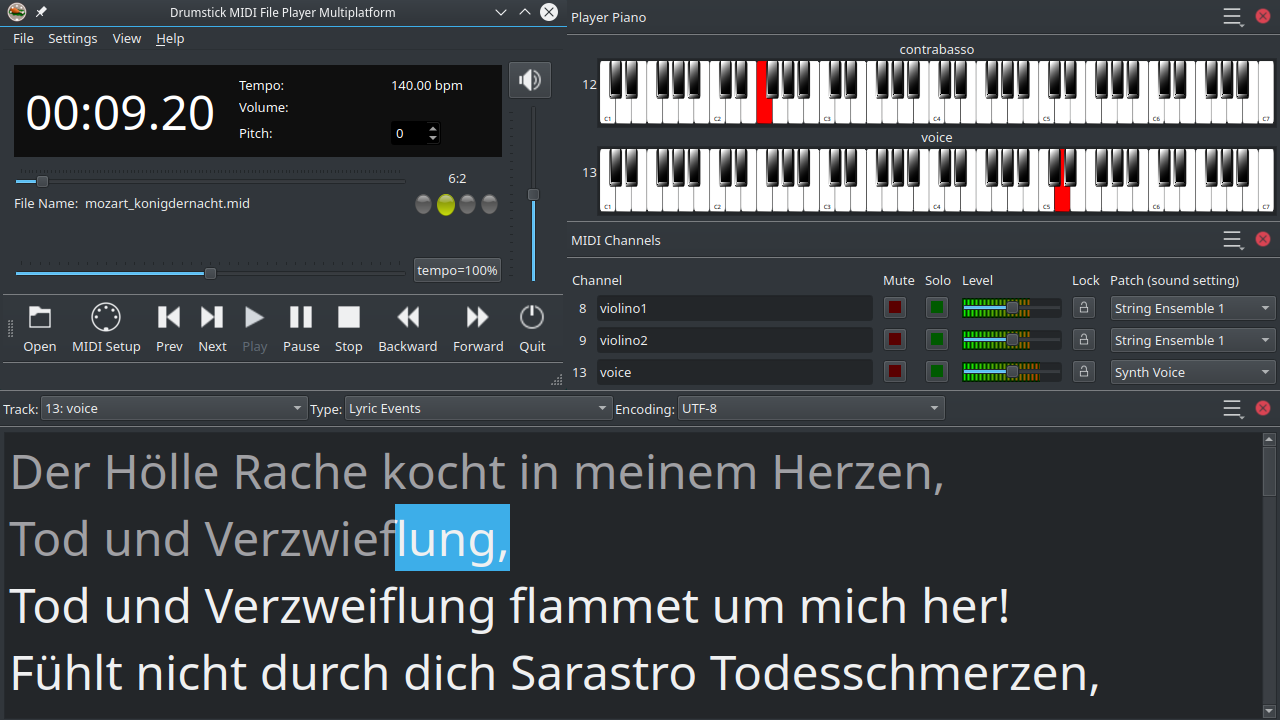
Drumstick Multiplatform MIDI File Player 1.3.0 has been released this week, right after the Drumstick Libraries 2.2.0 and VMPK 0.8.3; business as usual: we write programs, we release stuff. This post is about the first program, a MIDI file player (reloaded). Let's start by the beginning...

10 years ago, there was not a fully featured MIDI file player for Linux. Of course, there was Linux software that could (barely) play MIDI files, but nothing comparable to the vanBasco MIDI Karaoke player (which is a Windows 32 bit application, updated the last time in 2006). This program can be run in Wine, by the way. The key features of the vanBasco player are described in its site, and anyone with a musical background can identify its value, beyond the entertainment use case:

  • lyrics can be displayed in a resizable window or full-screen
  • control window: ability to change tempo, volume, key of song
  • real-time MIDI output window: shows notes, volumes, and instruments, can mute or play solo individual instruments
  • piano view: displays notes on a big piano keyboard

The KDE 4 desktop was starting to become mature and stable at the time, so I've decided to scratch my itch rewriting the old and abandoned KMid  application, adding my favorite features from vanBasco. This was already told on this blog a few times. KMid2 was a total rewrite almost from scratch, with the additional goal to make it multiplatform. Indeed, it was possible to build and run it on Linux, macOS and Windows, but there wasn't an easy way to deploy KDE programs on macOS and Windows at the time, so the only viable target was Linux. On the other hand, because the chosen architecture, it  was difficult to maintain and port the program to other platforms. Then, several Linux distributions boycotted this application, with the total indifference of the KDE community. Good riddance.

Fast forward to the roaring twenties. Nothing changed for Linux. The vanBasco player is still the king in the Windows world. In spite of most Windows 10 users running a 64 bit Operating System, vanBasco is rotting its 32 bits. The only alternative fulfilling the four mentioned features is Falcosoft MIDI player. I don't know about native macOS alternatives, either. Of course there are players for macOS, and WinAmp for Windows, and even VLC plays MIDI files, but that is not what I'm talking about...

I prefer to avoid hard use cases. Someone asked me once about my VMPK program: how it would be classified? Is it a Game? No, it is not a game, it is a toy! A game has a set of rules that the player must follow to reach the final goal: to win the game. On the other hand, a toy has no written rules. The player can explore, learn, and have fun on its own. No winners, no losers. Sometimes a good game may be repurposed by the users, like Wolfenstein 3D, but it is uncommon. It is in the definition of free software: the freedom to run the program as you wish, for any purpose.

Anyway, here is an usage example for this program: there is a choir, with a conductor or composer that arranges or edits pieces using some MIDI software like Rosegarden, MuseScore, Frescobaldi, or similar. He prints the scores (or exports PDF files for electronic distribution) for the singers. He also exports the pieces as MIDI files, that can be loaded by dmidiplayer, and used by the singers to learn and practice the lyrics and music of each voice. The examples in dmidiplayer include some choral music, edited in Rosegarden and directly exported as MIDI files.

You can download this program for free, either as sources that you may study, modify and build, or an AppImage for any Linux distro, or as ready to install packages for Windows, and macOS, from Sourceforge and GitHub.

There is also a Flatpak available at Flathub. And thanks to deb-multimedia, there are also deb packages for Debian and Ubuntu users.
Saturday, January 7, 2012

Choosing MIDI or Digital Audio by Analogy

Whenever I talk to someone about the relationship between MIDI and digital audio, one of my favorite analogies is that of computer images.

A digital raster image like a JPG file contains a bitmap. It is equivalent to an MP3 file containing digital audio. Both JPG and MP3 files contain quality loss compressed data, although other formats such as BMP and WAV files can contain pictures and digital sound without compression, respectively. In both cases the files store a set of digitized values. In the case of images, the data are individual pixels or dots that represent colors of the cells in a matrix of rows and columns that divide the digitized image. In the case of sound, individual data are samples that represent moments of time which divides the digitized sound. The digitization consists in dividing alike the image or sound into small fragments, the number of which depends on the resolution we want to get and the size of the scanned original.

Another type of images is called vector graphics. They are not suitable to represent photographs, but drawings. SVG files that are used in many illustrations of Wikipedia are of this type. Instead of image fragments, they contain symbolic descriptions using coordinates of points, distances, lines, and colors... They have the advantage of scalability without loss of quality, and ease of arbitrary modification of some of its components and properties without affecting the rest. The equivalent of this technology in the world of sound is MIDI. A MIDI sequence contains timestamped messages such as notes, instrument changes, controls, etc.. Not a proper format for storing sounds recorded by a microphone, but a symbolic representation of music similar to a score.

Images are two dimensional objects, so the digitized images consist of rows and columns of elements (pixels), and the position of the elements of a drawing is characterized by a pair of numbers that represent its Cartesian coordinates. On the other hand sound recordings are one-dimensional, sound samples are taken at constant time intervals and also MIDI messages are labeled by their position in the time line.

The above similarities have implications that reflect additional parallelism. An uncompressed digitized image consisting of any single solid color takes the same amount of memory than an image of the same size representing a photograph or a complex composition of multiple colors. Similarly, a recording of silence (for example John Cage's 4'33'') takes the same amount of memory than any symphonic piece of the same duration. On the other hand, a simple vector image takes much less memory than a complex picture of the same dimensions. And a few notes MIDI sequence occupies much less memory than a complex sequence of the same duration made up of many notes or other messages.

The problems posed by digital images and sounds on stretch and reduction of dimensions are also similar. In both cases artifacts are generated, an effect known as 'aliasing', which can be offset to some extent by using 'antialiasing' filters. On the other hand, in the case of vector graphics as MIDI sequences, you can easily perform stretching and shrinking of dimensions and duration without risking artifacts or quality loss whatsoever.

Starting from a vector image, it is necessary a rendering engine to get a digital image that can be displayed on the screen or a printer. In the case of MIDI, a sequencer and a MIDI synthesizer are required to produce digital audio that can be used by an audio interface.

The programs Inkscape and Gimp, used in Linux for creating and editing vector graphics and digital images respectively, are comparable to the Adobe programs Illustrator and Photoshop. They cover different needs and audience, thriving on  different niches. An example of this type of niche is the architects, who use vector graphics to design and represent buildings with Autocad or similar programs. These are not watertight compartments. Gimp can import vector graphic files, rendering them as bitmaps. Inkscape can also import a bitmap image as a drawing object. In each case, the users may choose the best tool for each task.

While it has been easy to list some essential image processing programs for Linux and other systems, to do the same exercise in the field of audio and MIDI is much more risky. The problem is that the way musicians work with computers is not homogeneous, with each musician working in a different way. For old school types the ideal work-flow is to note down  musical ideas, develop drafts and refine compositions using tools that work with symbolic elements, producing as a final result a paper copy of the score. Rosegarden could be appropriate at this stage. On the other extreme, there are those who never in his life read or write a score, and whose only tools of creation (other than musical instruments) are the mixer and multi-track recorder. In this case, Ardour could be right.

The two applications mentioned above allow the use of digital audio and MIDI at the same time. In the same way as in the world of images, some applications are focused on the symbolic representation (MIDI) and others in a final product (digital audio). In each case, the use of the other technology will be subordinate. For instance, Ardour MIDI messages are aligned to the audio samples. It has even developed an API (Jack MIDI) to ensure synchronization of MIDI events to digital audio samples, subordinating MIDI to the rules of digital audio. Obviously this strategy does not fit adequately on all scenarios where MIDI is useful.

As in the imaging world, symbolic representation (MIDI) is probably better suited for design, drafting and composition. By contrast, digital audio is the dominant technology in the studio, at mixing stage and production, to obtain a finished product.